Finally we are posting on our first custom rom tested by us! Hyperion 8!!
Firstly let me define what is custom rom!!
As you all people know ROM stands for Read Only Memory! In the case of Android its your OS with all the stock apps!
Stock ROM is the one that you get with your smartphone. It would have a lot of bloatware consuming your storage!
Whereas Custom ROM is customised by some developer to his own ways and keeps only the apps that are needed to run.
Kernel is one that will the main part of your ROM like a heart! It has various settings to keep your phone healthy, perform well, save battery and overclock as well!
Many Custom Roms have bugs but this one doesnt!! Believe me!! I have tested it for 2 weeks!
Description as given by the developer CarlDeanCatabay:-
JellyBean experience at its best
Everything you love about Hyperion and
JellyBean � the gorgeous UI , fast and fluid
performance, battery life � is everything you�ll
love about the new Hyperion, too. And you can
have the best of both it in one ROM.
A rom worthy of all Galaxy Y
Fast performance, superb stability, mouth
watering UI, useful features � It's something for
everyone. And Everything!
Incredible performance
Known for its fast, fluid performance, Hyperion
doesn�t disappoint. It features 23 powerful and
power-efficient CPU governors and 4 I/O
Scheduler, which makes everything you do feel
smooth and natural.
Hyperion wouldn�t be Hyperion without
incredible battery life . Even with so much
performance packed into such a small space, it
still lasts up to 2 days on a single charge* . So
you can read, watch, play, write, and create
whatever you want, as long as you want.
*battery life based on moderate usage with all
radios turned on at default policy settings.
Hyperion 8 highlights:
Total ear-gasm: ALSA ( AlsaProject) + Beats
Audio Engine v2
We combined and tuned up two sound engines
for superb sound quality when listening to
music. This time, sound enhancements are
activated at startup without the use of DSP
Manager. What does that mean? No more force
close when you connect/disconnect mass storage
mode on PC.
Mouth watering pixel goodness
Like JellyBean looks but sluggish like old granny?
Worry no more! Hyperion 8 combines JellyBean
UI and transparency into a piece of art. We don't
simply take frameworks, systemUI and put it in a
blender. We make sure we put "what belongs
together".
Project butter Hyperion style
We combined all the best tweaks out there for a
superb super smooth UI. Others would say "No!
That's not real! Project butter is JB only", yes
that is correct if you can't read between the
lines.
More juice more fun!
We hate running out of juice as much as you do,
so we made sure you can get the most of your
battery. We put 23 CPU governors and 5 IO
schedulers to tame that nasty CPU! And with
deep sleep? Your phone will get more sleep
than you do! -well at least for me this is a true
statement.
Features:
Basic - all custom roms must have:
1. De-Odexed
2. Zipaligned
3. Recompressed APKS
4. Optimized APK Images
5. Rooted
6. BusyBox and BusyBox run-parts support
7. Apps2SDenabled
Common - though not working in other roms:
1. 15 Toggle Notification Drawer
2. 6 Lockscreens from Gingerbread AOSP/CM with
custom app starter and gesture unlock
3. Status bar Tweaks + TEAM battery bar
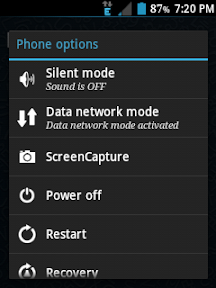
4. 4-way Reboot Options
5. Expanded Power Menu (because themers and
mods crash systemUI most of the time, we need
other ways of rebooting)
Unique - not all custom roms have:
1. No SMS Bug
2. No false Android version
3. No useless features
4. Least branding (Like creed parts or cod parts or
whatever. We don't like that. It's your phone,
not ours)
Advanced:
1. EXT4 File System Support
2. CIFS
3. Swap Support
4. BaCeM Tweak
5. UnderVolt Support
6. Firewall Support (DroidWall Open-Source Project)
7. Ad-blocking host file
Plus - only Hyperion:
1. Supercharged Hyperion Core v2 with Adrenaline
Engine v4.4
2. Transparent JellyBean user interface
3. Ear-gasmic sound quality
4. Integrated Autostart manager, Firewall and
Network Unlocker
5. Modular system structure
6. System Replacer
Experimental:
1. Force GPU Rendering - Force use of GPU for 2D
rendering
2. Disable HW overlays - Always use GPU for screen
compositing
3. Allow purging of assets - Purging of bitmap
memory assets allows freeing of more RAM when
needed (you can now get as low as 85-90mb
used RAM)
4. 32bit transparency - Better graphics
performance and full transparency support
It comes with savie kernel which saves battery a lot through various cpu settings and management!!
Now the steps and requirements!!
Requirements:-
1.Rooted phone (click hereto know how to root)
2.CWM
3.Rom
Backup all your apps and contacts through titanium backup or any other app of your choice!
Steps:-
1.Switch off your phone and go to recovery by pressing volume up+home+power button
2.Go to install from sd and patch CWM by opening it!
3. Now go to Mounts & storage and mount everything. System, sd card, sd ext, data
4. Go back to Advanced and clear battery stats and dalvic cache.
5. Go back and select clear data. It will format your phone. Now select clear cache
6. Go to install zip from sd > apply zip from sd card. Locate the rom zip file and select it! This will install the rom!
7. After installation completed go back and reboot!
8. First reboot may take time! At the Galaxy Y logo about 1.20mins and at the hyperion logo around 2minutes! Your phone will have a fresh look and have a fresh start!!
Enjoy!!
Just remember 3 steps! Mount everything, Clear everything, install zip!!
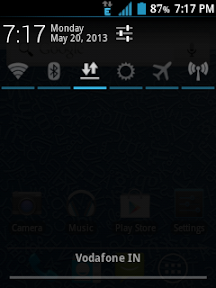
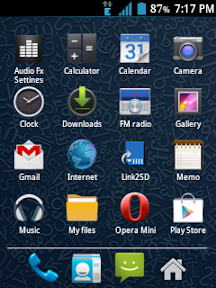
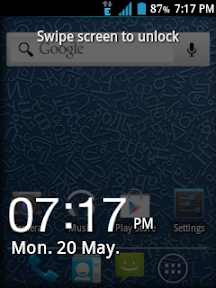
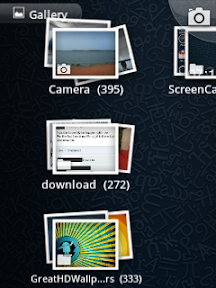
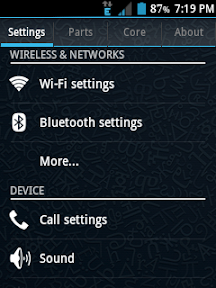
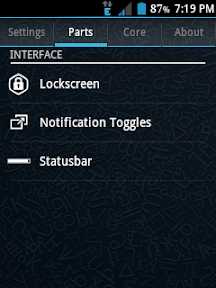
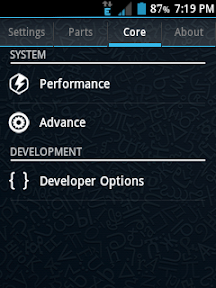
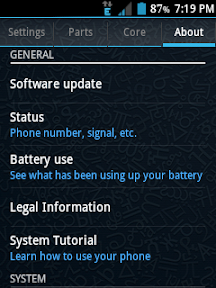
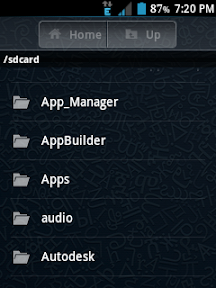
Here are some screenshots of the ROM from my phone!!



Wifi bug fixed:-
Go to wifi settings>advanced>sleep policy>never
No other problems or bugs!!
Note:-We are not responsible for any loss of your phone! If your phone is bricked ,dont worry its a soft one. You can correct it manually or go to your Service centre
Like us on facebook:-
GalaxyGamerZone
Tags:-
Hyperion 8, custom rom, galaxy y, best galaxy y rom, bug free rom galaxy y, hyperion 8 project 2013, hyperion 8 build 2, hyperion 8 for galaxy y free download
Firstly let me define what is custom rom!!
As you all people know ROM stands for Read Only Memory! In the case of Android its your OS with all the stock apps!
Stock ROM is the one that you get with your smartphone. It would have a lot of bloatware consuming your storage!
Whereas Custom ROM is customised by some developer to his own ways and keeps only the apps that are needed to run.
Kernel is one that will the main part of your ROM like a heart! It has various settings to keep your phone healthy, perform well, save battery and overclock as well!
Many Custom Roms have bugs but this one doesnt!! Believe me!! I have tested it for 2 weeks!
Description as given by the developer CarlDeanCatabay:-
JellyBean experience at its best
Everything you love about Hyperion and
JellyBean � the gorgeous UI , fast and fluid
performance, battery life � is everything you�ll
love about the new Hyperion, too. And you can
have the best of both it in one ROM.
A rom worthy of all Galaxy Y
Fast performance, superb stability, mouth
watering UI, useful features � It's something for
everyone. And Everything!
Incredible performance
Known for its fast, fluid performance, Hyperion
doesn�t disappoint. It features 23 powerful and
power-efficient CPU governors and 4 I/O
Scheduler, which makes everything you do feel
smooth and natural.
Hyperion wouldn�t be Hyperion without
incredible battery life . Even with so much
performance packed into such a small space, it
still lasts up to 2 days on a single charge* . So
you can read, watch, play, write, and create
whatever you want, as long as you want.
*battery life based on moderate usage with all
radios turned on at default policy settings.
Hyperion 8 highlights:
Total ear-gasm: ALSA ( AlsaProject) + Beats
Audio Engine v2
We combined and tuned up two sound engines
for superb sound quality when listening to
music. This time, sound enhancements are
activated at startup without the use of DSP
Manager. What does that mean? No more force
close when you connect/disconnect mass storage
mode on PC.
Mouth watering pixel goodness
Like JellyBean looks but sluggish like old granny?
Worry no more! Hyperion 8 combines JellyBean
UI and transparency into a piece of art. We don't
simply take frameworks, systemUI and put it in a
blender. We make sure we put "what belongs
together".
Project butter Hyperion style
We combined all the best tweaks out there for a
superb super smooth UI. Others would say "No!
That's not real! Project butter is JB only", yes
that is correct if you can't read between the
lines.
More juice more fun!
We hate running out of juice as much as you do,
so we made sure you can get the most of your
battery. We put 23 CPU governors and 5 IO
schedulers to tame that nasty CPU! And with
deep sleep? Your phone will get more sleep
than you do! -well at least for me this is a true
statement.
Features:
Basic - all custom roms must have:
1. De-Odexed
2. Zipaligned
3. Recompressed APKS
4. Optimized APK Images
5. Rooted
6. BusyBox and BusyBox run-parts support
7. Apps2SDenabled
Common - though not working in other roms:
1. 15 Toggle Notification Drawer
2. 6 Lockscreens from Gingerbread AOSP/CM with
custom app starter and gesture unlock
3. Status bar Tweaks + TEAM battery bar
4. 4-way Reboot Options
5. Expanded Power Menu (because themers and
mods crash systemUI most of the time, we need
other ways of rebooting)
Unique - not all custom roms have:
1. No SMS Bug
2. No false Android version
3. No useless features
4. Least branding (Like creed parts or cod parts or
whatever. We don't like that. It's your phone,
not ours)
Advanced:
1. EXT4 File System Support
2. CIFS
3. Swap Support
4. BaCeM Tweak
5. UnderVolt Support
6. Firewall Support (DroidWall Open-Source Project)
7. Ad-blocking host file
Plus - only Hyperion:
1. Supercharged Hyperion Core v2 with Adrenaline
Engine v4.4
2. Transparent JellyBean user interface
3. Ear-gasmic sound quality
4. Integrated Autostart manager, Firewall and
Network Unlocker
5. Modular system structure
6. System Replacer
Experimental:
1. Force GPU Rendering - Force use of GPU for 2D
rendering
2. Disable HW overlays - Always use GPU for screen
compositing
3. Allow purging of assets - Purging of bitmap
memory assets allows freeing of more RAM when
needed (you can now get as low as 85-90mb
used RAM)
4. 32bit transparency - Better graphics
performance and full transparency support
It comes with savie kernel which saves battery a lot through various cpu settings and management!!
Now the steps and requirements!!
Requirements:-
1.Rooted phone (click hereto know how to root)
2.CWM
3.Rom
Backup all your apps and contacts through titanium backup or any other app of your choice!
Steps:-
1.Switch off your phone and go to recovery by pressing volume up+home+power button
2.Go to install from sd and patch CWM by opening it!
3. Now go to Mounts & storage and mount everything. System, sd card, sd ext, data
4. Go back to Advanced and clear battery stats and dalvic cache.
5. Go back and select clear data. It will format your phone. Now select clear cache
6. Go to install zip from sd > apply zip from sd card. Locate the rom zip file and select it! This will install the rom!
7. After installation completed go back and reboot!
8. First reboot may take time! At the Galaxy Y logo about 1.20mins and at the hyperion logo around 2minutes! Your phone will have a fresh look and have a fresh start!!
Enjoy!!
Just remember 3 steps! Mount everything, Clear everything, install zip!!
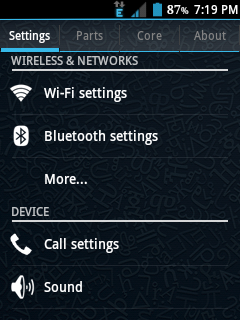
Here are some screenshots of the ROM from my phone!!




Wifi bug fixed:-
Go to wifi settings>advanced>sleep policy>never
No other problems or bugs!!
Note:-We are not responsible for any loss of your phone! If your phone is bricked ,dont worry its a soft one. You can correct it manually or go to your Service centre
Like us on facebook:-
GalaxyGamerZone
Tags:-
Hyperion 8, custom rom, galaxy y, best galaxy y rom, bug free rom galaxy y, hyperion 8 project 2013, hyperion 8 build 2, hyperion 8 for galaxy y free download